 Image 1 of 1
Checkbook Register & Budget
Most budgeting templates make you do the work twice, you record a purchase somewhere, then manually update your budget. Not this one.
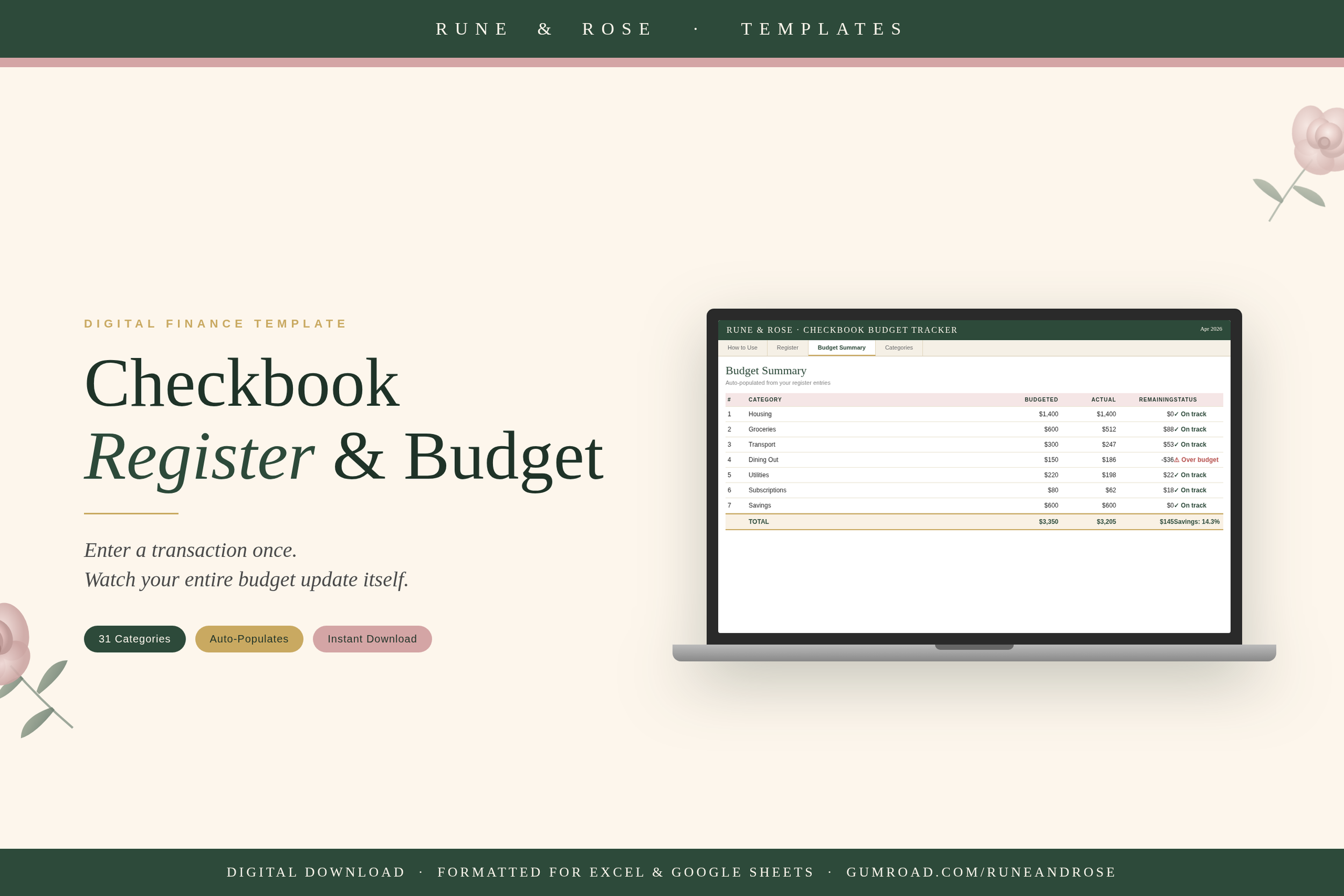
This Checkbook Register & Budget Tracker links your transaction log directly to your budget summary using smart formulas. Every time you record a purchase or deposit in the register and assign it a category from the dropdown menu, your budget summary updates on its own, no copy-pasting, no manual math, no end-of-month surprises.
Whether you are tracking a checking account, a savings account, or just trying to see where your money is going, this template gives you a clear, organized system that actually keeps up with your life.
What You Get
• Checkbook Register tab — 90 transaction rows with date, payee, category dropdown, withdrawal, deposit, cleared status, and running balance
• Budget Summary tab — auto-populates from your register using SUMIF formulas; shows budgeted vs. actual vs. difference for every category
• Categories tab — 31 pre-built categories across 9 groups (Housing, Food, Transport, Health, Lifestyle, Savings, Debt, Income, and more)
• How to Use tab — step-by-step guide so you can get started in under 10 minutes
• Compatible with Microsoft Excel (Windows and Mac) and Google Sheets
Features at a Glance
• Category dropdown menu — choose from 31 categories; no typing needed
• Running balance — auto-calculates after every transaction so you always know your balance
• Live budget summary — actual spending pulls from the register automatically
• On track / Over budget status flags — see at a glance which categories need attention
• Bank reconciliation column — mark transactions as cleared when they post to your bank
• Net summary — total income, total expenses, remaining balance, and savings rate all calculated for you
• Color-coded for clarity — blue cells for your inputs, green for auto-calculated values
• Clean, professional design in forest green, dusty rose, and gold
Who This Is For
• Anyone who wants one place to track both individual transactions and their overall budget
• People switching from paper checkbook registers to digital tracking
• Budgeters who are tired of updating multiple spreadsheets to keep their numbers in sync
• Anyone who has ever reached the end of the month wondering where their money went
• Beginners and experienced budgeters alike — the how-to guide walks you through every step
Frequently Asked Questions
Does this work in Google Sheets?
Yes. Open the file in Google Drive and the formulas and dropdowns will carry over. A small number of formatting details may look slightly different, but all functionality works.
How many transactions can it hold?
The register has 90 rows built in. If you need more, you can copy the last row and paste it below — the formulas will extend automatically.
Can I change the categories?
Absolutely. The Categories tab is where all categories live. Add, remove, or rename any category there and the dropdown in the register updates immediately.
Is this a recurring subscription?
No. This is a one-time purchase. You download the file once and use it forever — or duplicate it each month for a fresh start.
What format will I receive?
You will receive one .xlsx file (Excel format) immediately after purchase. No waiting, no shipping.
Add to cart and get organized today — your future self will thank you.
Most budgeting templates make you do the work twice, you record a purchase somewhere, then manually update your budget. Not this one.
This Checkbook Register & Budget Tracker links your transaction log directly to your budget summary using smart formulas. Every time you record a purchase or deposit in the register and assign it a category from the dropdown menu, your budget summary updates on its own, no copy-pasting, no manual math, no end-of-month surprises.
Whether you are tracking a checking account, a savings account, or just trying to see where your money is going, this template gives you a clear, organized system that actually keeps up with your life.
What You Get
• Checkbook Register tab — 90 transaction rows with date, payee, category dropdown, withdrawal, deposit, cleared status, and running balance
• Budget Summary tab — auto-populates from your register using SUMIF formulas; shows budgeted vs. actual vs. difference for every category
• Categories tab — 31 pre-built categories across 9 groups (Housing, Food, Transport, Health, Lifestyle, Savings, Debt, Income, and more)
• How to Use tab — step-by-step guide so you can get started in under 10 minutes
• Compatible with Microsoft Excel (Windows and Mac) and Google Sheets
Features at a Glance
• Category dropdown menu — choose from 31 categories; no typing needed
• Running balance — auto-calculates after every transaction so you always know your balance
• Live budget summary — actual spending pulls from the register automatically
• On track / Over budget status flags — see at a glance which categories need attention
• Bank reconciliation column — mark transactions as cleared when they post to your bank
• Net summary — total income, total expenses, remaining balance, and savings rate all calculated for you
• Color-coded for clarity — blue cells for your inputs, green for auto-calculated values
• Clean, professional design in forest green, dusty rose, and gold
Who This Is For
• Anyone who wants one place to track both individual transactions and their overall budget
• People switching from paper checkbook registers to digital tracking
• Budgeters who are tired of updating multiple spreadsheets to keep their numbers in sync
• Anyone who has ever reached the end of the month wondering where their money went
• Beginners and experienced budgeters alike — the how-to guide walks you through every step
Frequently Asked Questions
Does this work in Google Sheets?
Yes. Open the file in Google Drive and the formulas and dropdowns will carry over. A small number of formatting details may look slightly different, but all functionality works.
How many transactions can it hold?
The register has 90 rows built in. If you need more, you can copy the last row and paste it below — the formulas will extend automatically.
Can I change the categories?
Absolutely. The Categories tab is where all categories live. Add, remove, or rename any category there and the dropdown in the register updates immediately.
Is this a recurring subscription?
No. This is a one-time purchase. You download the file once and use it forever — or duplicate it each month for a fresh start.
What format will I receive?
You will receive one .xlsx file (Excel format) immediately after purchase. No waiting, no shipping.
Add to cart and get organized today — your future self will thank you.